STEP 1: CREATE A DSJ EXCHANGE ACCOUNT
STEP 2: FUND YOUR ACCOUNT
STEP 3: SET UP BONCHAT

Fund Your DSJ Exchange Account

Step 1: Login to Your DSJ Exchange

Login to DSJ Exchange.

Click any link below to log in to your DSJ Exchange account.

Enter your email address/phone number (which ever you used to create your account).

Then click the yellow Login button.

Step 2: Select Deposit

From the dashboard, click Deposit.

Note: Funding means your first deposit

Note: Recharging means adding more funds

The process is the same for both funding and recharging your account.

Step 3: How Funding Works

We're going to use USDT to fund your account which is already chosen by default.

Click the correct network which is ERC20 (Ethereum).

VERY IMPORTANT, CHOOSE:
  • Chain name: ERC20

IMPORTANT: Sending funds on the wrong chain name can result in lost funds.

Step 4: (Optional) Select Currency

You can also choose other currencies to fund your account if needed. Click Select currency on the top right to see the other options.

Step 5: (Optional) Available Currencies

The available currencies are:
  • USDT
  • Ethereum (ETH)
  • Bitcoin (BTC)
  • USDC

You can choose either of these above.

However, it is recommended to choose USDT like we did before. It's the fastest way to fund your account.

Choosing USDT can fund your account in 5 minutes or less.

We'll use USDT in these instructions.

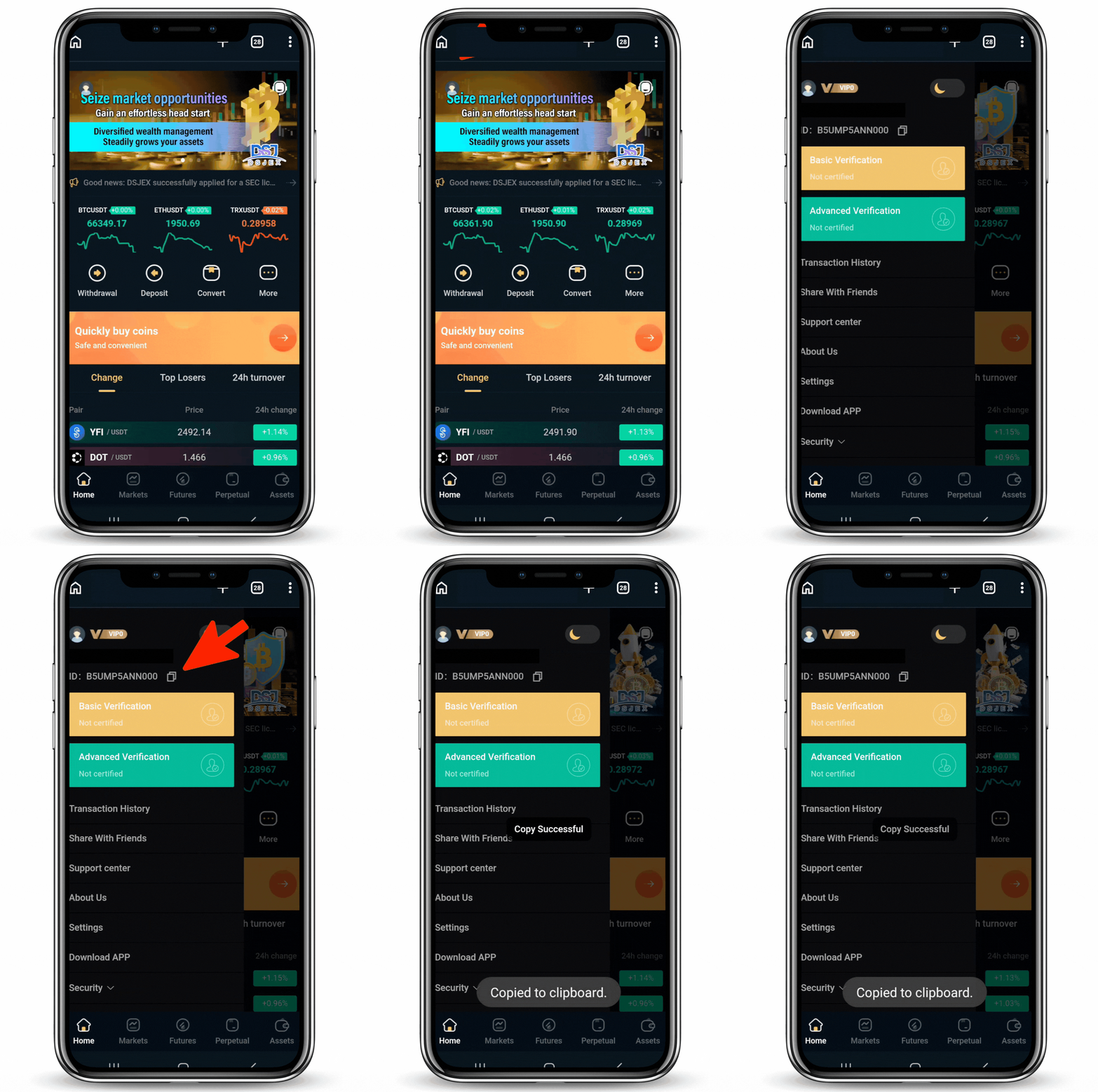
Step 6: Copy Your DSJ Deposit Address

Your deposit address will be displayed on the page. This is the address where you will send your funds.

Click the yellow Copy button.

You'll need this later.

Step 7: Select Buy Crypto

MoonPay is a way for you to buy crypto with your credit or debit card and send it directly to any wallet you want.

By default, your account will be Individuals. Make sure Individuals is selected. DO NOT CLICK BUSINESS

Click the link below.
Click here to go to MoonPay

Follow these steps in order:
  1. Tap the menu icon in the top right corner
  2. Select Buy
  3. Click Buy crypto

Step 8: Select Your Currency

Click Buy BTC.

This will open a list of all the available cryptocurrencies.

Scroll and select Tether (USDT / Ethereum) from the list.

IMPORTANT: Sending funds on the wrong asset can result in lost funds. So, be sure to select Tether (USDT / Ethereum).

Step 9: Enter Your Amount

Tap the dollar amount shown on the screen and enter the amount you want to purchase.

For this example, we will use $20.

However, you will enter your real amount such as $500, $1000 or more.

IMPORTANT: Be sure to add an additional $50 to your amount for your crypto purchase for transfer fees.

Example: If you are choosing to start with $500, you would enter $550. For $1000, you would enter $1050. This is also the same for higher amounts.

Click the Continue with Tether button.

Step 10: Enter Your Email

Enter your email address and click the Continue button to sign in or create your MoonPay account.

This steps works for both new and existing users.

Step 11: Verify Your Email

Check your email for the verification code from MoonPay.

Then enter the code in the boxes shown on your screen.

Step 12: Verify Your Identity

Tap the Get Started button and follow the quick verification steps to confirm your identity.

This is a standard security check when you purchase crypto with a debit/credit card. It only takes a few minutes to complete.

Step 13: Add Your Payment Method

Tap the top payment option (It may may say "Pay with Google Pay") to open the list of available payment methods.

From the dropdown, choose Debit/Credit Card.

Enter your card details in the fields provided.

Then, click Add Card to securely save your payment method and continue to the next step.

Step 14: Enter Your DSJ Deposit Address

VERY IMPORTANT: Follow these steps exactly to ensure your crypto is sent to your DSJ Trade account to get funded.

Tap the second address under the card you entered. This will allow you to edit the send address.

Paste the DSJ deposit address you copied earlier into the field.

If your DSJ address was not copied in the field, go back to Step 2 for instructions on copying your DSJ Deposit address.

Then, select your DSJ deposit address from the dropdown list.

Once selected, you'll return to the previous screen where you can confirm that your payment method and DSJ deposit address are both correct.

Double and triple check your DSJ deposit address is correct before continuing.

Step 15: Complete Your Payment

Review the details on the screen to make sure your amount, payment method and deposit address are correct.

Once everything look good, click the Pay with card button to submit your payment and begin the crypto purchase transaction.

Step 16: Enter the One-Time Passcode

Check your phone for a text message from MoonPay containing your one-time passcode.

Enter the code in the field shown on your screen then, click the Enter One-Time Passcode button to confirm and authorize the transaction.

Step 17: Transfer Funds to Your DSJ Trading Account

Your crypto should arrive in your DSJ Exchange account within 5-10 minutes.

Click any link below to log in to your DSJ Exchange account.
After you login, click Assets in the bottom right of the screen to view your balance.

Once you see the funds in your Exchange account, click Transfer in the top right.

On the transfer page, click All under Amount of transfers.

Then, click Confirm.

When the confirmation appears, click Done / OK.

Your funds are now in your DSJ Trading account and you're ready to begin trading.

Congratulations, You Did It 👍

Step 18: Create A BonChat Account

Now that your account is funded, complete the form below so I can get you connected with our team.

You'll automatically be taken to the steps to create a BonChat account so you can receive the codes to enter for your trades.

What's Your First & Last Name?

What's Your Email Address?

What's Your Phone#?

How Much Did You Fund Your Account With?

What's Your DSJ Exchange ID Number?

Got Questions?

If you have questions about funding your DSJ Exchange account, contact your referrer. Their contact information is below.

Name: Jeffrey Goodwin
Phone: 7073647386


Please remember that all trading involves risk. You should only invest what you are comfortable with.